

Leaving Logseq for Obsidian: what I lost, what I gained
Why I left Logseq
After three or four years of Logseq, I moved my notes to Obsidian. I was happy with Logseq, and there are still small things I miss. This post is about why I left anyway, what broke during the move, and what I had to rebuild.
First, an honest look at how I actually used Logseq. Two things mattered: daily notes and the outliner. Everything started as a bullet in today's journal, indented under other bullets. I never used block references or queries, the features Logseq fans love most. That turned out to be the key fact: it made the move much cheaper than I feared.
So why leave? Logseq released its new DB version, and I never managed to migrate to it. I was a heavy user: my whole life was in there, with lots of images, whiteboards and other media. The migration failed with a flood of errors. I'd fix one and a hundred more appeared; fix those and a thousand more showed up.
At some point I did the math. I was paying $5 a month for Logseq's cloud sync, and the effort to get my graph onto the new version kept growing. It wasn't worth it anymore, so I stopped paying for Logseq and now pay for Obsidian instead.
My setup is a Mac, an iPhone and an iPad. No Android, which simplified the sync choice.
Importing: easier than expected, with one hiccup
Obsidian has an official Importer plugin, and it has a Logseq option.
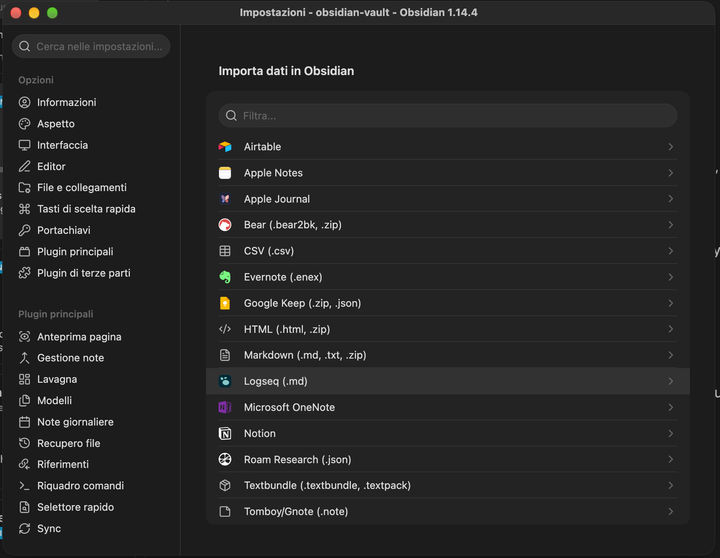
The import converted my graph into roughly 480 Markdown files, all in one flat folder. Well, sort of. Journals came across as daily notes, and the bullet structure survived as nested Markdown lists.
Sync: I paid for it
With only Apple devices, the free option is putting the vault in iCloud Drive. I skipped the experiment and bought Obsidian Sync.
The reason is simple: my WhatsApp backup already fills all my free iCloud space, and I didn't want to give it up to make room for my notes.
Setup took a few minutes: create a remote vault, connect the Mac, then the iPhone and iPad. Notes are end-to-end encrypted, so I'm the only person who can read them.
One more setting to check: plugin sync. If it's off, every plugin below has to be installed and configured again on each device.
Rebuilding my Logseq habits
Obsidian doesn't behave like an outliner out of the box. Six community plugins and one built-in setting got me back to how I worked in Logseq:
[SCREENSHOT: the list of installed community plugins]
| What I needed | What I use in Obsidian | Notes |
|---|---|---|
| Indent, outdent, move bullets around | Outliner | The closest thing to Logseq's editing feel |
| See where I am in deep nesting | List Tree Indentation Guides | Draws the vertical guide lines and shows a breadcrumb on hover |
| TODO / DOING / DONE | TODOseq | Uses Logseq-style keywords, so my imported tasks work as they are |
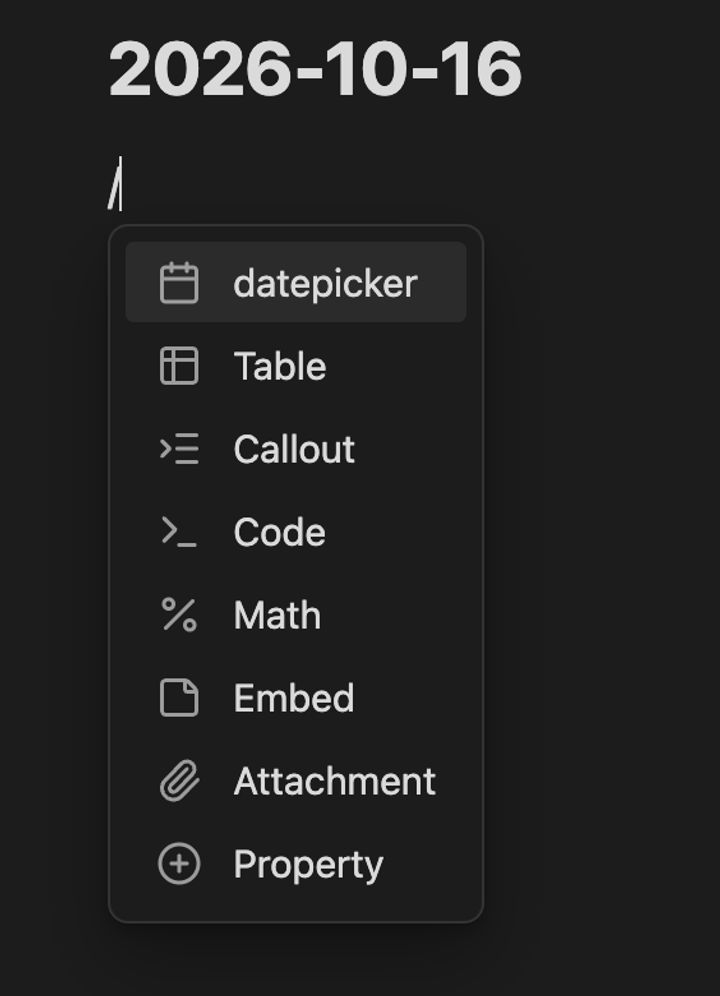
Type / for a command menu |
Slash Commander | Better than Logseq: any command can go in the menu, each with its own icon |
| Date picker that links a daily note | Natural Language Dates Revived | Unlike the original plugin, it opens a real date picker from the slash command |
| Find and replace in part of a note | Find and replace in selection | Limits the replace to the selected text |
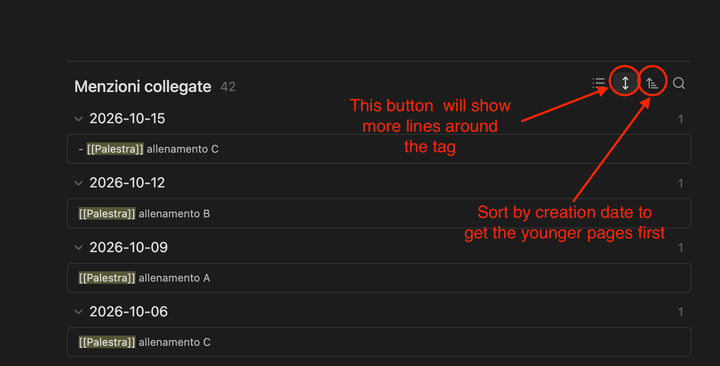
| Linked references with context | Built-in backlinks, "Show more context" toggle | No plugin needed |
The last row is the one I cared about most. In Logseq, opening a page like [[Gym]] showed every journal entry that mentioned it, together with the bullets around it. Obsidian does the same natively: the linked mentions at the bottom of the note are grouped by daily note, and with the "Show more context" toggle each mention expands to show the surrounding lines too. So I can still see not just when I went to the gym, but what else I wrote that day.
Day to day, I am still tweaking it, but I already feel satisfied enough.
Still open
480 notes in one folder. Logseq never made me think about folders. Obsidian does. Many of my notes belong to more than one area (work, side projects, home), so tags look like the better fit than folders. I haven't decided yet, and for now I don't really care: I'll probably let Claude fix the structure later.
Verdict, so far
I made it with a lot of help from AI.
I acknowledge that much of this work was to bring logseq's behaviour to obsidian, while obisidian itself has countless features and plugins I am not even aware of. So, who knows if in a couple of years I'll be using Obisidian in a completely other way.
If you only use Logseq for journals and an outliner, the move is a weekend job. If you live on block references and queries, think twice: that's the part Obsidian can't give back for free.